Thinkware Q1000 Facts: 137 Specifications & 56 Highlights
Thinking about buying the Thinkware Q1000? These 137 specs & performance — especially general information, video & recording performance, camera & lens system & display & interface — might be all the reason you need.
 Supermod
  Moderator
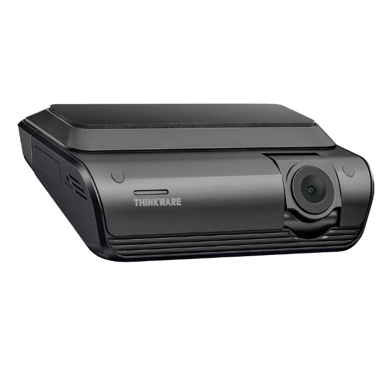
Highlights 56
No extras. Just what matters.Why is Thinkware Q1000 better than other dash cams ?
Video & Recording Performance
- Continuous Recording Available
- Supports HDR
- Supports WDR
- Provides Night Vision Mode
- Low-Light Enhancement Available
- Supports Loop Recording
- Supports Emergency Recording
- Supports Dual Recording
- Time-Lapse Recording Available
- Features Parking Recording Mode
- Features Audio Recording
- Audio Recording Disable Option Available
Camera & Lens System
Scroll down for more factsDisplay & Interface
Scroll down for more factsConnectivity & Smart Features
- Live View Available
- Features AI Event Detection
- Supports Wi-Fi Connectivity
- Bluetooth Connectivity Enabled
- Cloud Access Enabled
- Provides GPS Module
- App-Based Control Supported
- Easy Video Downloads
- Offers GPS Speed Logging
- Features GPS Location Logging
- Includes Driver Assistance Alerts
- Supports Smart Notifications
Safety, Security & Parking Protection
- Offers G-Sensor
- Provides Collision Detection
- Features Parking Mode Impact Detection
- Offers Parking Mode Motion Detection
- Includes Battery Drain Protection
- Provides Low-Voltage Cutoff
- Features Tamper Detection
- Offers File Lock Protection
- Features Theft Deterrence Mode
- Offers Lane Departure Alert
- Provides Forward Collision Warning
Power, Battery & Charging
- Heat Resistance Design
- Supports Supercapacitor
- Supports Hardwire Kit
- Charging While Recording Available
- Provides Cold Start Reliability
- Features Auto Power On
- Features Auto Power Off
Storage & File Management
Scroll down for more factsBuild, Dimensions & Mounting
Scroll down for more factsComparisons 2
Make your choice now!


Quick Take
The essentials that matter—nothing extraA fast snapshot of the Thinkware Q1000, covering its standout specification and what you can expect right out of the box.

Thinkware Q1000 is a premium dash cam designed for drivers who want a balance of high-quality recording and smart connectivity features. It captures crisp 2K QHD video with HDR support, delivering clear footage in both daytime and low-light conditions. With built-in WiFi, Bluetooth, and cloud connectivity, it allows remote monitoring and notifications, making it ideal for both daily driving and parked vehicle protection.
Specifications & Facts 137
Specs measured. Drama avoided.Price matters, but so do the specs. The Thinkware Q1000 dash cam includes 137 you need to see — like general information, video & recording performance, camera & lens system & display & interface and how it stacks up in the real world.
General Information 18
Thinkware Q1000 Operating Temperature Range
What temperature range does it support?
0 Thinkware Q1000 0 Votes 14°F to 140°F
Dash Cam in this range Who knows?

Operating temperature range is 14°F to 140°F (-10°C to 60°C), indicating the device is rated for typical hot and cold climates.
This range is relevant for installation in regions with extreme summer heat or very cold winters.
Defines the temperature range where the dash cam operates reliably.
Thinkware Q1000 Camera Configuration
What camera configuration does it use?
0 Thinkware Q1000 0 Votes Front, Front + Rear
Dash Cam in this range Who knows?
Supports both Front and Front + Rear configurations, giving flexibility for single- or dual-channel recording setups.
Indicates how many cameras and viewing angles are supported.
Thinkware Q1000 Mounting Type
How is the dash cam mounted?
0 Thinkware Q1000 0 Votes Windshield
Dash Cam in this range Who knows?
Mounting type is Windshield, meaning the camera is intended to be attached to the front glass for optimal forward-facing coverage.
Describes where and how the dash cam is mounted in the vehicle.
Thinkware Q1000 Release Year
What year was it released?
0 Thinkware Q1000 0 Votes 2022
Dash Cam in this range Who knows?
Released in 2022, which gives a clear expectation of available features and firmware support for that model.
Indicates the year the product model was released.
Thinkware Q1000 Power Source Type
What is the power source?
0 Thinkware Q1000 0 Votes Vehicle Power, Supercapacitor
Dash Cam in this range Who knows?
Primary power is via Vehicle Power, and the unit includes a Supercapacitor for short-term backup and safer shutdowns instead of a lithium battery.
Identifies how the dash cam is powered.
Thinkware Q1000 Device Type
What type of device is this?
0 Thinkware Q1000 0 Votes Dash Cam
Dash Cam in this range Who knows?
Defines the product category and primary function.
Video & Recording Performance 21
Thinkware Q1000 Rear Camera Resolution
What is the rear camera resolution?
0 Thinkware Q1000 0 Votes 1440p
Dash Cam in this range Who knows?
Rear camera records at 1440p, providing noticeably higher detail than 1080p for clearer license plate and scene capture.
Indicates the resolution of the rear-facing camera.
Thinkware Q1000 Video Codec
What video codec is used?
0 Thinkware Q1000 0 Votes H.264, H.265
Dash Cam in this range Who knows?
Records using H.264 and H.265 codecs; H.265 offers better compression efficiency for longer retention or higher-quality footage at similar file sizes.
Defines the compression format used for video files.
Thinkware Q1000 Continuous Recording
Can it record continuously?
Yes 0Votes Thinkware Q1000
Dash Cam in this range Who knows?
Continuous recording means the device records in a loop while powered, automatically overwriting the oldest footage when storage is full.
Indicates support for uninterrupted recording sessions.
Thinkware Q1000 Front Camera Resolution
What is the front camera resolution?
0 Thinkware Q1000 0 Votes 1440p
Dash Cam in this range Who knows?
Specifies the video resolution of the front-facing camera.
Thinkware Q1000 Front Frame Rate
What is the front camera frame rate?
Dash Cam in this range Who knows?
Measures how smoothly the front camera records motion.
Thinkware Q1000 Rear Frame Rate
What is the rear camera frame rate?
Dash Cam in this range Who knows?
Indicates the rear camera’s recording smoothness.
Camera & Lens System 14
Thinkware Q1000 Front Lens Field of View
What is the front lens field of view?
Dash Cam in this range Who knows?
Front lens has a field of view of 156°, offering wide coverage to capture multiple lanes and roadside details.
Indicates how wide the front camera can capture the road.
Thinkware Q1000 Rear Lens Field of View
What is the rear lens field of view?
Dash Cam in this range Who knows?
Rear lens field of view is 160°, providing broad rear coverage which is useful for parking and reversing events.
Defines the viewing angle of the rear-facing lens.
Thinkware Q1000 Lens Aperture
What is the lens aperture?
0 Thinkware Q1000 0 Votes f/1.7
Dash Cam in this range Who knows?
Lens aperture is f/1.7, allowing more light onto the sensor for improved low-light performance and clearer night recordings.
Describes the lens opening size affecting low-light performance.
Thinkware Q1000 Lens Element Count
How many lens elements are used?
0 Thinkware Q1000 0 Votes 6-element
Dash Cam in this range Who knows?
Lens construction is 6-element, which typically improves sharpness and reduces optical aberrations compared with simpler lens assemblies.
Indicates how many glass elements make up the lens.
Thinkware Q1000 Lens Type
What type of lens is used?
0 Thinkware Q1000 0 Votes Glass
Dash Cam in this range Who knows?
Lens material is Glass, which usually offers better optical clarity and durability compared with plastic alternatives.
Specifies the material and construction of the lens.
Thinkware Q1000 Sensor Type
What sensor type is used?
0 Thinkware Q1000 0 Votes CMOS
Dash Cam in this range Who knows?
Identifies the imaging sensor technology used.
Display & Interface 8
Thinkware Q1000 Built-in Display
Does it have a built-in display?
No 0Votes Thinkware Q1000
Dash Cam in this range Who knows?
Indicates whether the dash cam includes an integrated screen.
Thinkware Q1000 Touchscreen
Is the display touchscreen-enabled?
No 0Votes Thinkware Q1000
Dash Cam in this range Who knows?
Indicates whether the screen supports touch input.
Thinkware Q1000 Screen Rotation
Does the screen rotate automatically?
No 0Votes Thinkware Q1000
Dash Cam in this range Who knows?
Allows the display to rotate based on mounting orientation.
Thinkware Q1000 Screen Auto-Off
Does the screen turn off automatically?
No 0Votes Thinkware Q1000
Dash Cam in this range Who knows?
Turns off the screen automatically to reduce distraction.
Thinkware Q1000 Status LED Indicators
Are status LEDs included?
Yes 0Votes Thinkware Q1000
Dash Cam in this range Who knows?
Uses LED lights to show recording or system status.
Thinkware Q1000 Physical Control Buttons
Does it have physical buttons?
Yes 0Votes Thinkware Q1000
Dash Cam in this range Who knows?
Indicates presence of tactile buttons for control.
Connectivity & Smart Features 14
Thinkware Q1000 Live View via App
Can you view live footage in the app?
Yes 0Votes Thinkware Q1000
Dash Cam in this range Who knows?
Live view via the mobile app allows remote monitoring of the camera feed on a paired smartphone while driving or when parked.
Enables real-time camera viewing through the mobile app.
Thinkware Q1000 AI Event Detection
Does it use AI event detection?
Yes 0Votes Thinkware Q1000
Dash Cam in this range Who knows?
AI event detection flags incidents such as collisions or sudden maneuvers, making it easier to locate important clips in the footage.
Uses AI to detect incidents like collisions or sudden braking.
Thinkware Q1000 Wi-Fi Connectivity
Does it support Wi-Fi?
Yes 0Votes Thinkware Q1000
Dash Cam in this range Who knows?
Indicates whether the dash cam supports Wi-Fi connectivity.
Thinkware Q1000 Bluetooth Connectivity
Does it support Bluetooth?
Yes 0Votes Thinkware Q1000
Dash Cam in this range Who knows?
Enables short-range wireless communication with other devices.
Thinkware Q1000 Cloud Connectivity
Does it support cloud connectivity?
Yes 0Votes Thinkware Q1000
Dash Cam in this range Who knows?
Allows footage upload and access via cloud services.
Thinkware Q1000 GPS Module
Does it have GPS?
Yes 0Votes Thinkware Q1000
Dash Cam in this range Who knows?
Indicates whether a built-in GPS module is included.
Safety, Security & Parking Protection 14
Thinkware Q1000 G-Sensor
Does it have a G-sensor?
Yes 0Votes Thinkware Q1000
Dash Cam in this range Who knows?
Detects sudden impacts or collisions automatically.
Thinkware Q1000 Collision Detection
Does it detect collisions?
Yes 0Votes Thinkware Q1000
Dash Cam in this range Who knows?
Automatically detects collisions while driving.
Thinkware Q1000 Parking Mode Impact Detection
Does it detect impacts in parking mode?
Yes 0Votes Thinkware Q1000
Dash Cam in this range Who knows?
Detects impacts while the vehicle is parked.
Thinkware Q1000 Parking Mode Motion Detection
Does it detect motion while parked?
Yes 0Votes Thinkware Q1000
Dash Cam in this range Who knows?
Triggers recording when motion is detected near the vehicle.
Thinkware Q1000 Battery Drain Protection
Is battery drain protection included?
Yes 0Votes Thinkware Q1000
Dash Cam in this range Who knows?
Prevents excessive vehicle battery drain.
Thinkware Q1000 Low-Voltage Cutoff
Does it have low-voltage cutoff?
Yes 0Votes Thinkware Q1000
Dash Cam in this range Who knows?
Automatically cuts power when voltage drops too low.
Power, Battery & Charging 12
Thinkware Q1000 Power Input Voltage
What input voltage does it require?
Dash Cam in this range Who knows?
Designed to operate on 12 Volt vehicle systems, which is the standard for most passenger cars and light trucks.
Defines the voltage required to power the dash cam.
Thinkware Q1000 USB Connector Type
What USB connector type is used?
0 Thinkware Q1000 0 Votes USB-C
Dash Cam in this range Who knows?
Uses a USB-C connector for data and power, providing a modern, reversible connection with broad accessory compatibility.
Specifies the USB port used for power and data.
Thinkware Q1000 Heat Resistance Design
Is it designed for heat resistance?
Yes 0Votes Thinkware Q1000
Dash Cam in this range Who knows?
Heat-resistant design means the unit is intended to tolerate higher interior temperatures and reduce heat-related failures.
This helps reliability when the vehicle is parked in direct sun for extended periods.
Designed to withstand high in-vehicle temperatures.
Thinkware Q1000 Power Consumption
What is the power consumption?
Dash Cam in this range Who knows?
Typical power consumption is 5 Watt during normal operation, useful for estimating load on a vehicle circuit when hardwiring multiple accessories.
Measures how much power the dash cam consumes.
Thinkware Q1000 Supercapacitor
Does it support a supercapacitor?
Yes 0Votes Thinkware Q1000
Dash Cam in this range Who knows?
Indicates support for supercapacitors instead of batteries.
Thinkware Q1000 Charging Method
How is the dash cam charged?
0 Thinkware Q1000 0 Votes Hardwire
Dash Cam in this range Who knows?
Describes how the device receives power.
Storage & File Management 12
Thinkware Q1000 Included Storage
How much storage is included?
Dash Cam in this range Who knows?
Includes 32 GB of onboard storage; this capacity supports several hours of footage depending on resolution and codec settings.
Indicates the amount of storage included out of the box.
Thinkware Q1000 Maximum Supported Storage
What is the maximum supported storage?
Dash Cam in this range Who knows?
Maximum supported storage is 256 GB, allowing for extended recording durations when using high-capacity microSD cards.
Defines the maximum expandable storage capacity supported.
Thinkware Q1000 Storage Speed Class Requirement
What storage speed class is required?
0 Thinkware Q1000 0 Votes UHS-I U3 or Higher
Dash Cam in this range Who knows?
Specifies the minimum card speed required for stable recording.
Thinkware Q1000 File Format
What file format is used?
0 Thinkware Q1000 0 Votes MP4
Dash Cam in this range Who knows?
Defines the video file format used for recordings.
Thinkware Q1000 File Segmentation Interval
How long is each video segment?
0 Thinkware Q1000 0 Votes 1-5 Minutes
Dash Cam in this range Who knows?
Determines how long each recorded video file is.
Thinkware Q1000 Overwrite Protection
Are important files protected from overwrite?
Yes 0Votes Thinkware Q1000
Dash Cam in this range Who knows?
Prevents protected files from being overwritten.
Build, Dimensions & Mounting 14
Thinkware Q1000 Main Unit Width
What is the main unit width?
Dash Cam in this range Who knows?
Main unit width is 3.94 inch (10.01 cm), which helps determine how much windshield space the unit will occupy.
Measures the horizontal width of the main dash cam unit.
Thinkware Q1000 Main Unit Depth
What is the main unit depth?
Dash Cam in this range Who knows?
Main unit depth is 1.18 inch (3.00 cm), supporting a slim profile that reduces obstruction and improves aesthetics.
Measures the front-to-back depth of the main unit.
Thinkware Q1000 Main Unit Height
What is the main unit height?
Dash Cam in this range Who knows?
Main unit height measures 2.36 inch (5.99 cm), contributing to the overall compact footprint of the dash cam.
Measures the vertical height of the main dash cam unit.
Thinkware Q1000 Rear Camera Width
What is the rear camera width?
Dash Cam in this range Who knows?
Rear camera width is 2.36 inch (5.99 cm), a compact size suitable for discrete mounting.
Measures the width of the rear camera module.
Thinkware Q1000 Rear Camera Depth
What is the rear camera depth?
Dash Cam in this range Who knows?
Rear camera depth is 1.18 inch (3.00 cm), allowing for low-visibility mounting on rear windows or pillars.
Indicates the depth of the rear camera housing.
Thinkware Q1000 Rear Camera Height
What is the rear camera height?
Dash Cam in this range Who knows?
Rear camera height is 1.18 inch (3.00 cm), supporting a compact, low-profile installation that minimizes obstruction of the driver's view.
Measures the height of the rear camera module.
Maintenance, Updates & Ownership 10
Thinkware Q1000 Firmware Update Frequency
How often are firmware updates provided?
0 Thinkware Q1000 0 Votes Regular
Dash Cam in this range Who knows?
Firmware updates are classified as Regular, indicating the manufacturer provides timely improvements and security patches.
Describes how frequently firmware updates are released by the manufacturer.
Thinkware Q1000 Average Lifespan
What is the average lifespan?
Dash Cam in this range Who knows?
Average expected lifespan is 5 years under normal use, which helps set expectations for replacement cycles.
Estimates the typical usable lifespan of the device.
Thinkware Q1000 Update Delivery Method
How are updates delivered?
0 Thinkware Q1000 0 Votes App-Based, OTA, SD Card
Dash Cam in this range Who knows?
Specifies how firmware updates are delivered.
Thinkware Q1000 Operating Noise Level
How loud is the dash cam?
Dash Cam in this range Who knows?
Measures any operational noise produced during use.
Thinkware Q1000 Maintenance Requirement
What maintenance is required?
0 Thinkware Q1000 0 Votes Low
Dash Cam in this range Who knows?
Describes the level of routine maintenance required to keep the dash cam functioning properly.
Thinkware Q1000 Cleaning Requirement
How does it need to be cleaned?
0 Thinkware Q1000 0 Votes Wipe Lens Regularly
Dash Cam in this range Who knows?
Indicates how often and how the device should be cleaned for optimal performance.
Surveys
Because hot takes deserve votes.Thinkware Q1000 Video Recording Quality
How satisfied are you with the video clarity and detail captured by this dash cam during daytime and nighttime driving?
Thinkware Q1000 Field of View Coverage
How well does this dash cam capture the road area in front of the vehicle?
Thinkware Q1000 Night Recording Performance
How effective is this dash cam at recording clear footage in low light or nighttime conditions?
Thinkware Q1000 Ease of Setup and Installation
How easy is it to install and start using this dash cam for the first time?
Thinkware Q1000 App and Software Experience
How smooth and user friendly is the app or software used with this dash cam?
Thinkware Q1000 Reliability and Durability
How reliable does this dash cam feel during daily driving over time?
Thinkware Q1000 Power and Heat Management
How well does this dash cam handle heat and power during long drives?
Thinkware Q1000 Storage and Loop Recording
How well does this dash cam manage video storage and loop recording?
Thinkware Q1000 Design and Build Appeal
How appealing and discreet is the design of this dash cam inside the car?
Thinkware Q1000 Overall Ease of Daily Use
How convenient is this dash cam to use during everyday driving?
Guides 1
Yes, we brought proof.Files 1
Thinkware Q1000 Manual (PDF)

Reviews 0
The good, the bad, and the brutally honest.Average Rating

Discussions 0
Thoughts, takes, and hot debates.Awards 0
Only the best made it here.Collections 0
Treasures You’ve picked. No fluff, all fun.Contributed Users 8
Crowdsourced brilliance. Or chaos. You decide. 0 Cartling 0 Cartling 0 Cartling 0 Cartling 0 Cartling 0 Cartling 0 Cartling
 More Dash Cams 12
Unlock more awesome finds.Dash Cams like Thinkware Q1000 1

Other Thinkware Dash Cams 11

User Activities 8
All the clicks, all the chaos, all the wisdom.
Has added a new reaction
Has added a new reaction
Has added a new reaction
Has added a new reaction
Has added a new reaction


